在 Visual Studio 中創建 Extension
- 在 Visual Studio 中,選擇 [Tools] > [Options],並在 [Projects and Solutions] > [Locations] 下,將 [User project templates location] 設定為 Spotfire SDK 中 [Templates] 資料夾的路徑。
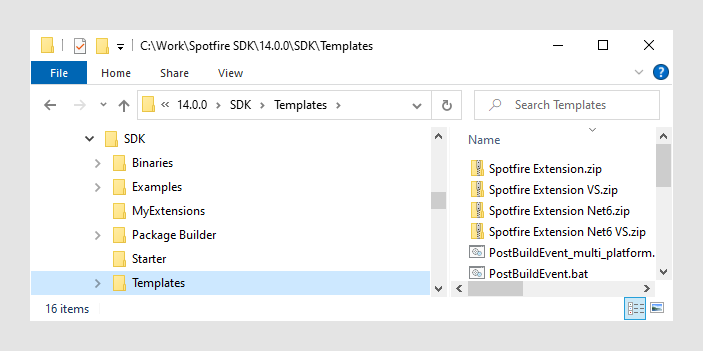
- 在 Visual Studio 中,選擇 [File] > [New] > [Project],然後選擇 [TIBCO Spotfire Extension_VS] 或 [TIBCO Spotfire Extension Net6_VS] 範本。請注意,TIBCO Spotfire Extension Net6_VS 範本是一個 SDK-style 專案,它允許同時為多個平台進行構建。這是本範例中使用的範本。為了使預定義的後置構建步驟正常工作,
- 新專案的位置必須在 SDK 中的 MyExtensions 文件夾中
(或者在同一級別的其他文件夾中)
並選取 [Place solution and project in the same directory] 核取方塊。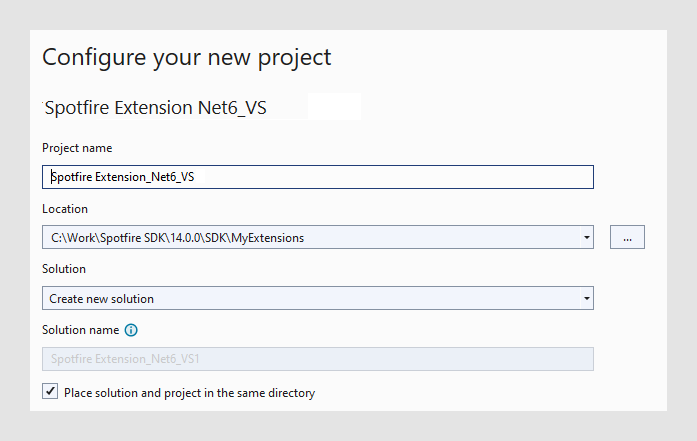
- 透過選擇 [Build] > [Build Solution] 來編譯新建立的專案。這將會產生一個新的子資料夾
MyExtensions\Build,其中會存放所有建置產物。- 編譯後的二進制文件與 SDK 二進制文件會儲存在
Build\bin\中。例如,Build\bin\net6.0或Build\bin\AnyCPU\Debug。 - 一個或多個 Spotfire 套件檔案 (.spk) 儲存在 Build 資料夾中。
- 套件檔案的未打包版本儲存在
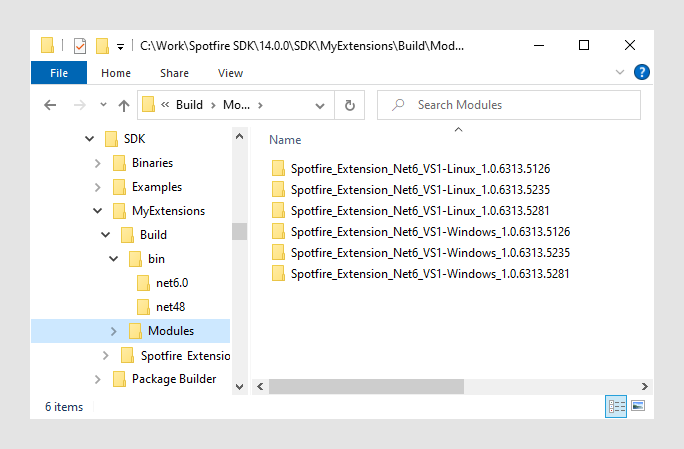
Build\Modules\<Extension-name>_<Version number>中。例如,TIBCO Spotfire_Extension_Net6_VS-Windows_1.0.6320.3907。這樣與下載的 Spotfire 的擴充方式一致,更易於 debug。
- 編譯後的二進制文件與 SDK 二進制文件會儲存在
- 為了能夠除錯擴充功能,需在 Visual Studio 中手動進行以下配置:
- 在 Solution Explorer 中選擇擴充功能專案。
- 選擇 [View] > [Property Pages]。
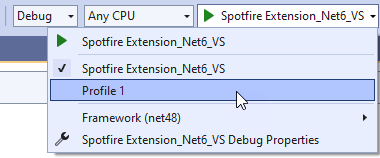
- 在 Debug 頁面上,點擊 [Open debug launch profiles UI],然後在 [Launch Profiles] 對話框中執行以下操作:
- 點擊 [Create a new profile],並選擇 [Executable]。
- 在 [Executable] 下,指向電腦中的
Spotfire.Dxp.exe。它可以是安裝的版本、某些中間測試版本或類似版本。例如,C:\Users\{username}\AppData\Local\TIBCO\Spotfire\12.0.0\Spotfire.Dxp.exe。 - 在 CLI 下,輸入
/loadallmodules /addmodulefolder:<SDK 中模組資料夾的路徑>,舉例:
/loadallmodules /addmodulefolder:C:\SpotfireSDK\SDK\MyExtensions\Build\Modules`。
- 為了驗證擴展功能已經載入,請在 Visual Studio 中選擇新的 Debug 檔案,並運行它以確保 Spotfire 已啟動。
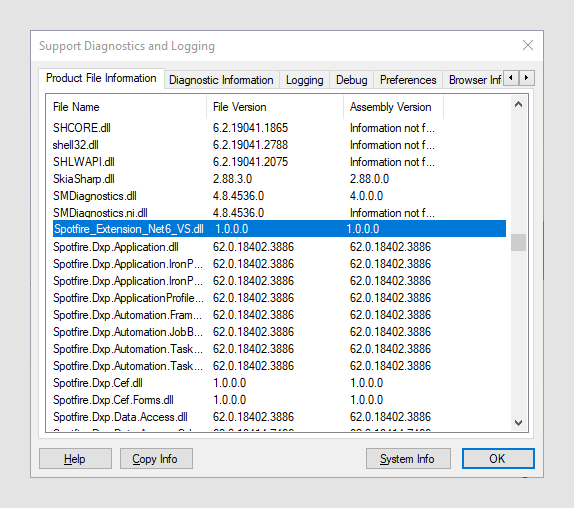
- 在 Spotfire 中,請前往 [Help] > [Support Diagnostics and Logging],向下捲動已載入檔案的清單,以確認擴充功能已載入。
- 使用標準管理使用者介面 [Deployments & Packages],將儲存在 Build 資料夾中的套件檔案部署到 Spotfire 伺服器。
自訂環境和進階資訊
可以透過編輯 post-build command 來配置 Visual Studio 環境。
- 在 Solution Explorer 中選擇擴充的專案。
- 選擇 [View] > [Property Pages]。
- 在 [Build Event] 頁面上,查看 [Post-build event command line]
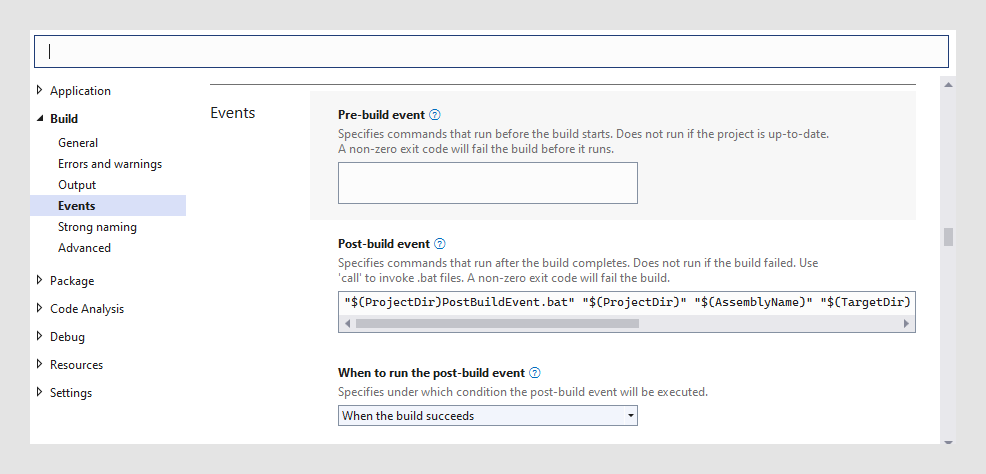
- 根據需求修改後置命令,後置命令會執行位於專案資料夾中的
PostBuildEvent.bat檔案。TIBCO Spotfire Extension_VS.zip模板的後置檔案需要四個參數,TIBCO Spotfire Extension Net6 VS.zip則需要六個參數。由 Visual Studio Macro 來定義,分別為:$(ProjectDir):專案資料夾的完整路徑。$(ProjectName):項目的名稱。$(TargetDir):創建 Packge 應儲存的資料夾。$(Configuration):建置設定(Debug/Release)。$(TargetFramework):目標框架。("net48"for Window,"net6.0"for Linux)$(AdditionBinaryFolders):一個以分號分隔的額外添加的二進制文件夾列表,用於 refpath 參數。
在 PostBuildEvent.bat 檔案後的後置命令為:
"%~1..\..\..\Package Builder\Spotfire.Dxp.PackageBuilder-Console.exe" /pkdesc:"%~1%~2.pkdesc" /target:"%~1..\..\build\%~2.spk" /basefolder:"%~3..\%~4" /refpath:"%~3..\%~4;%~1..\..\..\Binaries" /saveunpackedmodule /unpackedmodulefolder:"%~1..\..\Build\Modules" /automaticpackageversionnumber- 基本上是在呼叫
Spotfire.Dxp.PackageBuilder-Console.exe,並帶有一些包含專參參考的特定引數。如果選擇對擴充功能儲存位置進行任何更改,或需要更改輸出位置,則需要進行手動更改,無論是對發佈後建置命令檔案發送的引數進行修改,或是對發佈後建置檔案本身進行修改:"%~1..\..\..\Package Builder\Spotfire.Dxp.PackageBuilder-Console.exe"- 這必須指向 SDK 中包含的 Package Builder Console。
%~1是由第一個參數定義的完整路徑,它指向包含 csproj 檔案的資料夾(包括尾部反斜線)。
/pkdesc:"%~1%~2.pkdesc"- 此參數識別擴展套件的 pkdesc 檔案。請注意,一個 pkdesc 檔案可以包含多個組件(即 Visual Studio 中的專案),但這不是必要的。
%~1是由第一個參數定義的完整路徑,它指向包含 csproj 檔案的資料夾(包括尾部反斜線)。%~2應該包含 pkdesc 檔案的檔名,不包含副檔名。
/target:"%~1..\..\build\%~2.spk"- 此參數識別輸出套件檔案的路徑和名稱。
%~1是由第一個參數定義的完整路徑,它指向包含 csproj 檔案的資料夾(包括尾部反斜線)。%~2應包含 pkdesc 檔案的檔名(不含副檔名),此引數的預設值指向建置資料夾。
/basefolder:"%~3..\%~4"- 此參數識別 pkdesc 檔案中提及的檔案和資料夾的根目錄。
%~3是第三個參數給定的建置資料夾路徑。在範例專案中,預設為 ”…\Build\bin\AnyCPU\Debug”。請注意,巨集包含尾部反斜線,這意味著尾部的雙引號將不被識別。因此,在建置時添加尾部的 “..\%~4” 以避免錯誤。%~4是預設的建置設定 (Debug / Release),通常情況下,不需要更改此參數。
/refpath:"%~3..\%~4;%~1..\..\..\Binaries"- 此參數識別存放所有相依組件的資料夾。
%~3是第三個參數給定的建置資料夾路徑。在範例專案中,預設為 ”…\Build\bin\AnyCPU\Debug”。請注意,巨集包含尾部反斜線,這意味著尾部的雙引號將不被識別。因此,在建置時添加尾部的 ” ..%~4 ” 以避免錯誤。%~4是預設的建置設定 (Debug / Release)。- 通常,至少應該包括Spotfire SDK組件,但擴展還可能依賴於更多組件。示例項目指向兩個由分號分隔的文件夾;擴展的構建文件夾和SDK二進制文件夾。如果您的擴展需要更多文件夾,請添加分號以分隔它們。
/saveunpackedmodule- 如果已經將擴充功能編譯成其他 Spotfire SDK 二進位檔案,則需要相應地更改最後一個路徑。
- 此參數會讓套件建置工具控制台解壓縮所建立的套件並將其存儲在磁碟上。這是為了能夠無縫地調試擴展所必需的。
/unpackedmodulefolder:"%~1..\..\Build\Modules"- 此參數指向未打包模組應存儲的文件夾。
%~1是由第一個參數定義的完整路徑,指向包含 csproj 檔案的資料夾(包括尾部反斜線)。
/automaticpackageversionnumber- 此參數告訴 Package Builder Console 自動為套件產生唯一的版本號碼(不是任何包含的檔案)。這是一個方便的功能,以確保新建立的套件在部署到 Spotfire Server 時可以取代現有的套件。
- 使用此參數的一個副作用是,每次編譯時您都會在「未打包的模組」文件夾中獲得一個新的模組文件夾。因此,如果您經常重新編譯,您可能需要偶爾清除此文件夾。
- 若不想每次編譯時都建立 Package,可在編輯 PostBuildEvent.bat 並在在命令前加前綴
rem。
- 使用
.pkdesc檔案代替module.xml檔案- 與傳統的套件生成器不同,當專注於使用 Visual Studio 時,不需要編輯 module.xml 檔案。相反地,套件檔案中包含的 module.xml 檔案是由套件生成器控制台根據 .pkdesc 檔案中的規格創建的。範例專案包含一個最小的 .pkdesc 檔案,可用作起點,完整的 .pkdesc 格式參考可在此處找到。
- 將多個專案新增至解決方案
- 您可以將所有專案打包在同一個 Package 中,或者您可以將多個套件添加到 Solution 中。
- 如果要為每個專案單獨做打包,可以透過實作後,為每個專案都做後建置處理。
- 然而,如果要在一個 Package 中包含多個 Assemblies,則必須對 Visual Studio 中的專案進行一些更改。
- 建議將 pkdesc 檔案存放在解決方案檔案 (.sln) 所在的資料夾中,而非位於專案資料夾之一,並且檔名應對應到所有包含的組件的描述。通常這是向上一個資料夾層級。
- 只有其中一個專案應包含後建置步驟。請確保該專案是編譯相依性鏈中的最後一個專案之一。
- 必須編輯 pkdesc 檔案,以包含套件中包含的所有組件的相關資訊。
- 必須確保後建置步驟的引數
/pkdesc有正確的值。
- 使用 .pkdesc 檔案作為範本。
如果您決定使用 pkdesc 檔案作為模板並複製它,必須確保在檔案中創建一個新的
GUID作為識別符。這可以在 Visual Studio 中通過執行**[工具]** > [建立 GUID] 輕鬆完成。由於 Spotfire Server 根據其 ID 識別 Package,如果未替換副本中的 GUID,則在部署時新的 Package 將覆蓋現有的 Package。當然,還應更新 Package 名稱,以避免部署了多個具有相同名稱的 Package。